BY-Processes
Key processes trigerred by Buying team are as given below:
- PO-based Procurement : Variants - Standard Opex Procurement,Standard Capex Procurement
- Service/Contract based Procurement
- Non Po based Procurement
Key activites that need to be performed in the given sequence are as given below:
PO-based Procurement : Variant - Standard Opex Procurement

| Activity | Executed by | Navigation | Link |
|---|---|---|---|
| Material Request Creation | Various Department | Navigation :Home > Select Buying Module > Select Material request Creation | [Click Here] |
| Supplier Quotation Creation & Submit | Various Department | "Navigation 1 (to create Independent supplier quotation): Home>Select Buying Module> Select Supplier Quotation Creation Navigation 2 (to create Supplier Quotation with reference to Material Request) or RFQ : Home>Select Buying Module> Select Material request > Select Request for quotation " | [Click Here] |
| Approval Process | As per Approval Matrix | Approval Workflow | [Click Here] |
| Material Request Submit | As per Approval Matrix | Navigation:Home > Select Buying Module > Select Material request which we got the Approval | [Click Here] |
| Purchase Order Creation | General Affairs/HT Secretary | Navigation 1(to create Independent Purchase Order) : Home>Select Buying Module> Select Purchase order Creation Navigation 2 (to create Purchase Order with reference to Material Request ) : Home>Select Buying Module> Select Material request Navigation 3 ( to create Purchase Order with reference to Material Request ) : Home>Select Buying Module> Select Material request > Select Supplier quotation | [Click Here] |
| Purchase Receipt | General Affairs/ HT Secretary | Navigation 1 : Home>Select Buying Module> Select Purchase Receipt Creation Navigation 2 : Home>Select Buying Module>Select Purchase order>Select Purchase Receipt | [Click Here] |
| Purchase Invoice Creation | Senior Marketing Manager / HT Secretary / General Affairs | Navigation: Home > Select Buying Module > Select Purchase Invoice Creation | [Click Here] |
| Purchase Invoice Verification & Submit | AP Executive / Finance Manager | Home > Go to Buying Module > Go to Purchase Invoice | [Click Here] |
| Payment Request Creation | Senior Marketing Manager / HT Secretary / General Affairs | Navigation: Home > Select Buying Module > Select Purchase Invoice Created>Click on Create Tab> Select Payment Request | [Click Here] |
| Outgoing Bank Entry Creation | AP Executive | Home > Go to Accounting Module > Select Payables > Go to Payment Entry > Click on New Payment Entry | [Click Here] |
| Payment Reconciliation | "AP Executive / Finance Manager" | Home > Go to Accounting Module > Select Payables >Go to Payment Reconciliation | [Click Here] |
PO-based Procurement : Variant - Standard Capex Procurement
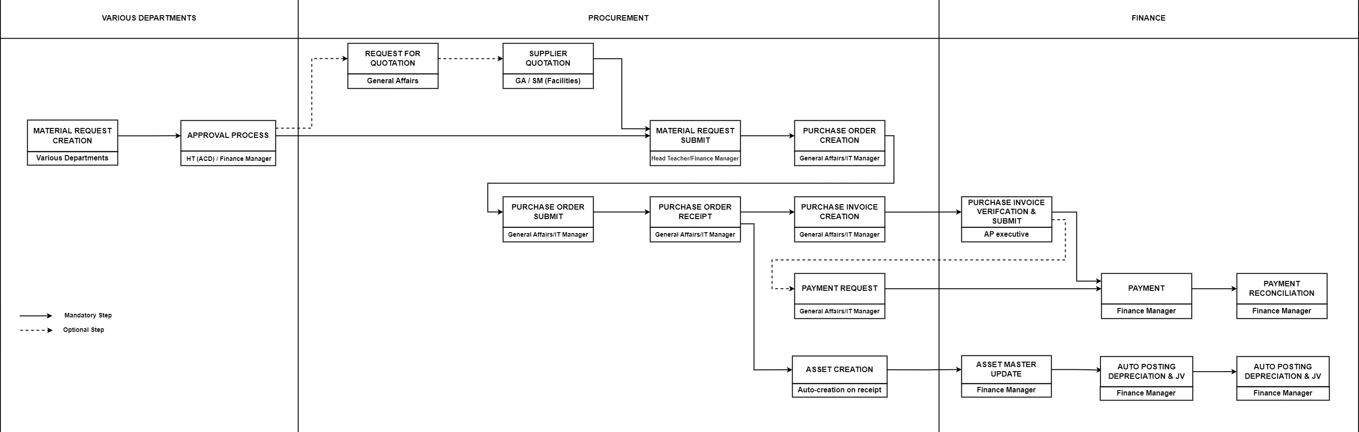
| Activity | Executed by | Navigation | Link |
|---|---|---|---|
| Material Request Creation | Various Department | Navigation :Home > Select Buying Module > Select Material request Creation | [Click Here] |
| Supplier Quotation Creation & Submit | Various Department | "Navigation 1 (to create Independent supplier quotation): Home>Select Buying Module> Select Supplier Quotation Creation Navigation 2 (to create Supplier Quotation with reference to Material Request) or RFQ : Home>Select Buying Module> Select Material request > Select Request for quotation " | [Click Here] |
| Approval Process | As per Approval Matrix | Approval Workflow | [Click Here] |
| Material Request Submit | As per Approval Matrix | Navigation:Home > Select Buying Module > Select Material request which we got the Approval | [Click Here] |
| Purchase Order Creation | General Affairs | Navigation 1(to create Independent Purchase Order) : Home>Select Buying Module> Select Purchase order Creation Navigation 2 (to create Purchase Order with reference to Material Request ) : Home>Select Buying Module> Select Material request Navigation 3 ( to create Purchase Order with reference to Material Request ) : Home>Select Buying Module> Select Material request > Select Supplier quotation | [Click Here] |
| Purchase Receipt | General Affairs | Navigation 1 : Home>Select Buying Module> Select Purchase Receipt Creation Navigation 2 : Home>Select Buying Module>Select Purchase order>Select Purchase Receipt | [Click Here] |
| Asset Creation | Finance Manager | Auto creation of asset on Purchase Receipt Submit | [Click Here] |
| Asset master update | Finance Manager | Home > Go to Asset Module > Click on Asset Master | [Click Here] |
| Asset depreciation schedule | Finance Manager | Home > Go to Asset Module > Asset Depreciation Schedule | [Click Here] |
| Auto posting depreciation and journal voucher | Finance Manager | Home > Go to Accounting Module > Journal Entries | [Click Here] |
| Purchase Invoice Creation | General Affairs | Navigation: Home > Select Buying Module > Select Purchase Invoice Creation | [Click Here] |
| Purchase Invoice Verification & Submit | AP Executive / Finance Manager | Home > Go to Buying Module > Go to Purchase Invoice | [Click Here] |
| Payment Request Creation | General Affairs | Navigation: Home > Select Buying Module > Select Purchase Invoice Created>Click on Create Tab> Select Payment Request | [Click Here] |
| Outgoing Bank Entry Creation | AP Executive | Home > Go to Accounting Module > Select Payables > Go to Payment Entry > Click on New Payment Entry | [Click Here] |
| Payment Reconciliation | "AP Executive / Finance Manager" | Home > Go to Accounting Module > Select Payables >Go to Payment Reconciliation | [Click Here] |
Service/Contract based Procurement :
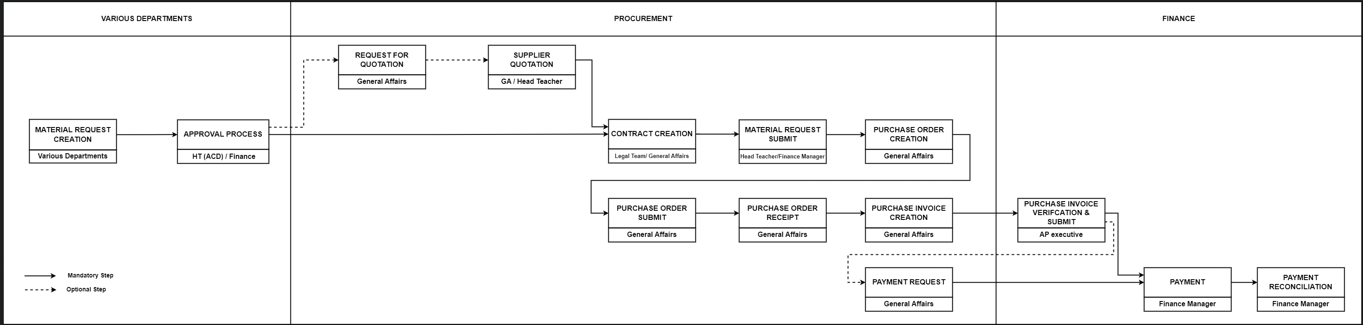
| Activity | Executed by | Navigation | Link |
|---|---|---|---|
| Material Request Creation | Various Department | Navigation :Home > Select Buying Module > Select Material request Creation | [Click Here] |
| Supplier Quotation Creation & Submit | Various Department | "Navigation 1 (to create Independent supplier quotation): Home>Select Buying Module> Select Supplier Quotation Creation Navigation 2 (to create Supplier Quotation with reference to Material Request) or RFQ : Home>Select Buying Module> Select Material request > Select Request for quotation " | [Click Here] |
| Approval Process | As per Approval Matrix | Approval Workflow | [Click Here] |
| Material Request Submit | As per Approval Matrix | Navigation:Home > Select Buying Module > Select Material request which we got the Approval | [Click Here] |
| Purchase Order Creation | General Affairs | Navigation 1(to create Independent Purchase Order) : Home>Select Buying Module> Select Purchase order Creation Navigation 2 (to create Purchase Order with reference to Material Request ) : Home>Select Buying Module> Select Material request Navigation 3 ( to create Purchase Order with reference to Material Request ) : Home>Select Buying Module> Select Material request > Select Supplier quotation | [Click Here] |
| Purchase Receipt | General Affairs | Navigation 1 : Home>Select Buying Module> Select Purchase Receipt Creation Navigation 2 : Home>Select Buying Module>Select Purchase order>Select Purchase Receipt | [Click Here] |
| Purchase Invoice Creation | General Affairs | Navigation: Home > Select Buying Module > Select Purchase Invoice Creation | [Click Here] |
| Purchase Invoice Verification & Submit | AP Executive / Finance Manager | Home > Go to Buying Module > Go to Purchase Invoice | [Click Here] |
| Payment Request Creation | General Affairs | Navigation: Home > Select Buying Module > Select Purchase Invoice Created>Click on Create Tab> Select Payment Request | [Click Here] |
| Outgoing Bank Entry Creation (Advance Payment Entry) | AP Executive | Home > Go to Accounting Module > Select Payables > Go to Payment Entry > Click on New Payment Entry | [Click Here] |
| Outgoing Bank Entry Creation (Remaining Payment Entry) | AP Executive | Home > Go to Accounting Module > Select Payables > Go to Payment Entry > Click on New Payment Entry | [Click Here] |
| Payment Reconciliation | "AP Executive / Finance Manager" | Home > Go to Accounting Module > Select Payables >Go to Payment Reconciliation | [Click Here] |
Non PO based Procurement :
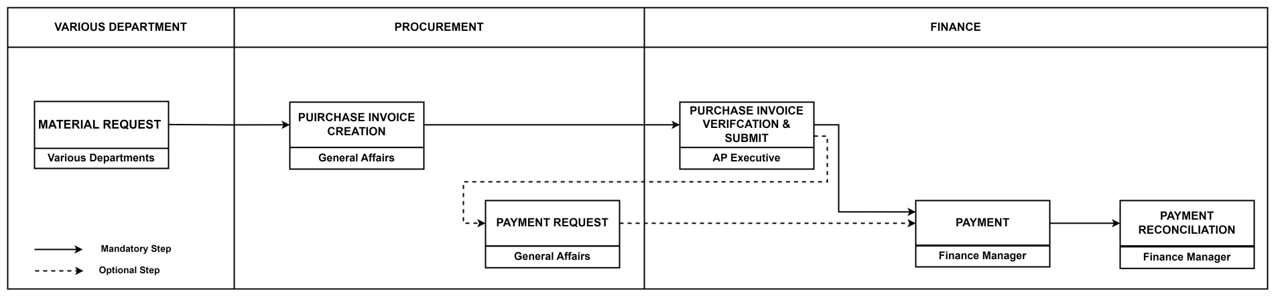
| Activity | Executed by | Navigation | Link |
|---|---|---|---|
| Material Request Creation | Various Department | Navigation :Home > Select Buying Module > Select Material request Creation | [Click Here] |
| Material Request Submit | As per Approval Matrix | Navigation:Home > Select Buying Module > Select Material request which we got the Approval | [Click Here] |
| Purchase Invoice Creation | Requestor | Navigation: Home > Select Buying Module > Select Purchase Invoice Creation | [Click Here] |
| Purchase Invoice Verification & Submit | AP Executive / Finance Manager | Home > Go to Buying Module > Go to Purchase Invoice | [Click Here] |
| Payment Request Creation | Requestor | Navigation: Home > Select Buying Module > Select Purchase Invoice Created>Click on Create Tab> Select Payment Request | [Click Here] |
| Outgoing Bank Entry Creation (Advance Payment Entry) | AP Executive | Home > Go to Accounting Module > Select Payables > Go to Payment Entry > Click on New Payment Entry | [Click Here] |
| Outgoing Bank Entry Creation (Remaining Payment Entry) | AP Executive | Home > Go to Accounting Module > Select Payables > Go to Payment Entry > Click on New Payment Entry | [Click Here] |
| Payment Reconciliation | "AP Executive / Finance Manager" | Home > Go to Accounting Module > Select Payables >Go to Payment Reconciliation | [Click Here] |