CRM- Processes
The CRM key processes are listed below:
- Campaign Management
- Lead Management
- Student Admission Key activites that need to be performed in the given sequence are as given below:
Campaign Management
New Campaign Creation variant- Process flow
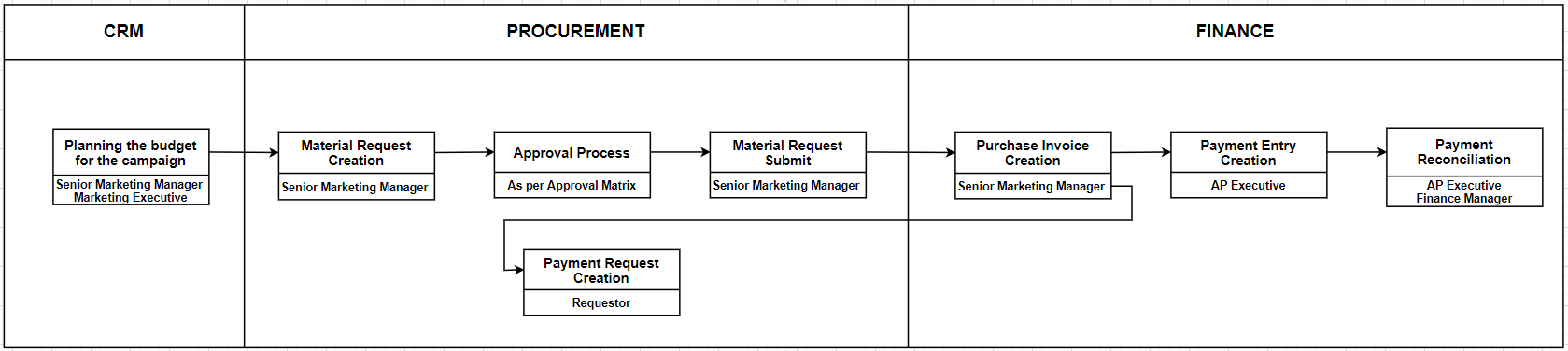
Various activities executed under this process are given below:
| Activity | Executed by | Navigation | Link |
|---|---|---|---|
| Planning the budget for the campaign | Senior Marketing Manager Marketing Executive | Home > CRM > Campaign > Add Campaign | [Click here] |
| Material Request Creation | Various Department | Home > Select Buying Module > Select Material request Creation | [Click Here] |
| Approval Process | As per Approval Matrix | Approval Workflow | [Click Here] |
| Material Request Submit | As per Approval Matrix | Home > Select Buying Module > Select Material request which we got the Approval | [Click Here] |
| Purchase Invoice Creation | Senior Marketing Manager / Requestor / General Affairs | Home > Select Buying Module > Select Purchase Invoice Creation | [Click Here] |
| Payment Request Creation | Requestor | Home > Select Buying Module > Select Purchase Invoice Created>Click on Create Tab> Select Payment Request | [Click Here] |
| Bank Entry Creation | Finance Business Partner | Home > Accounting > Bank Entry | [ClickHere] |
| Payment Reconciliation | AP Executive / Finance Manager | Home > Go to Accounting Module > Select Payables > Go to Payment Reconciliation | [Click Here] |
Lead Management
Various activities executed under this process are given below:
| Activity | Executed by | Navigation | Link |
|---|---|---|---|
| Lead Creation | Marketing Executive | Lead creation through Web Form: Home> Website > Web Form > Web Form List OR Manual Lead Creation: Home > CRM > Sales Pipeline > Lead in ERPNext | [Click here] |
| Lead Follow-Up Updation | Marketing Executive Admission Manager | Home > CRM >Sales Pipeline > Lead > Follow up tab | [Click here] |
| Lead Status Updation | Marketing Executive | Home > CRM > Lead > Lead List | [Click here] |
Student Admission
| Activity | Executed by | Navigation | Link |
|---|---|---|---|
| Lead Status Updation | Marketing Executive | Home > CRM > Lead > Lead List | [Click here] |