CRM- Planning the budget for the campaign
Executed by
Senior Marketing Manager Marketing Executive
Processes trigerred from
New Campaign Creation "(Variant)"
Navigation
Navigation: Home > CRM > Campaign > Add Campaign
Steps
- Enter Campaign Name choose a unique and descriptive name for your campaign.
- Select Campaign Type choose the type of campaign (e.g., digital marketing, email marketing, social media, etc.).
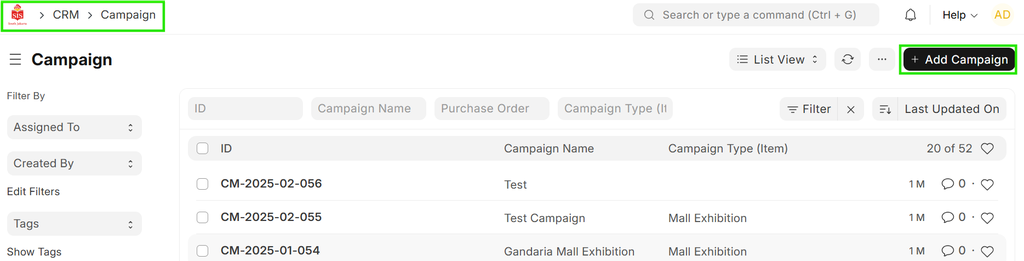
- Set Budget Amount determine the total budget for the campaign.
- Set Start Date - Choose the date when the campaign will start.
- Set End Date - Choose the date when the campaign will end.
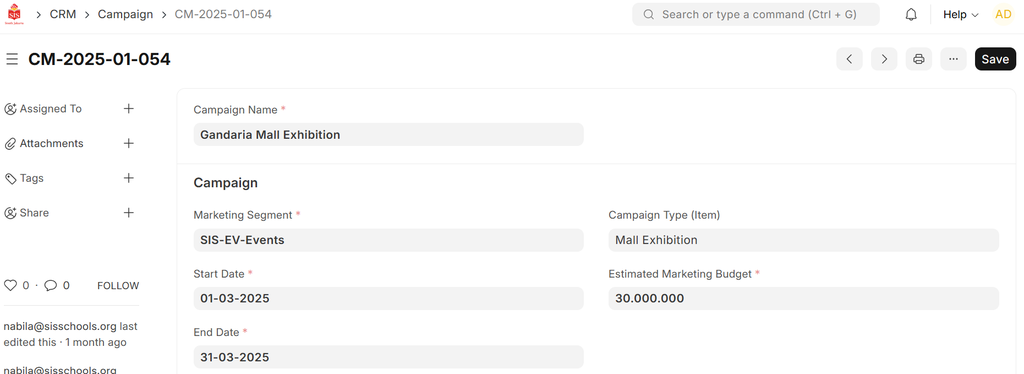 6. Save Campaign.
After filling in all the details, save the campaign to store the information.
6. Save Campaign.
After filling in all the details, save the campaign to store the information.